Ask in plain words. Otty checks your accounting, job system, CRM, email and Teams, answers with the source behind every number, and drafts the deck or the follow-up. Built for construction, restoration and field service teams.
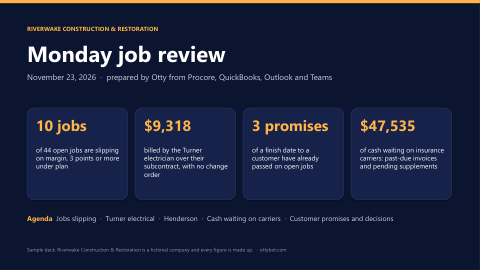
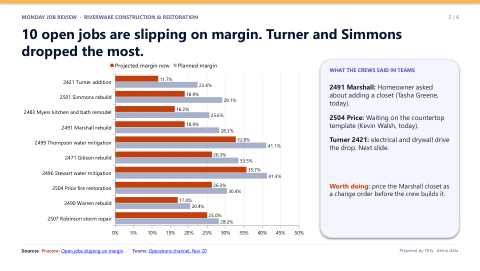
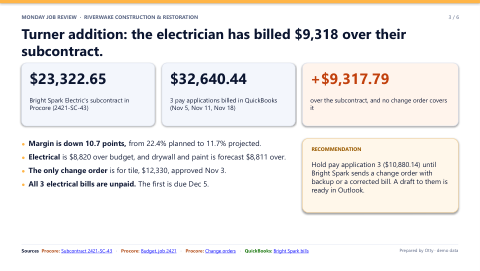
Margin is down from 22.4% to 11.7%, and electrical leads it. Bright Spark's subcontract in Procore is $23,323, but QuickBooks has three pay applications from them totaling $32,640, and no change order covers the difference. None of the three bills is paid yet. Drywall and paint is forecast $8,811 over as well.
Three drafts in your Outlook: Bright Spark about the $9,318, Eddie about the Stewart and Myers dates, and Tasha about Coleman. Here's the first:
To Bright Spark Electric
Subject Turner addition, job 2421: billing over subcontract 2421-SC-43
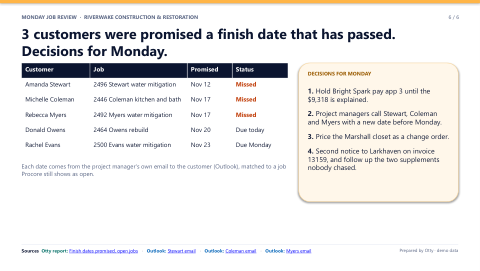
Hi, your three pay applications on the Turner addition total $32,640.44, against subcontract 2421-SC-43 for $23,322.65. We don't have a change order for the $9,317.79 difference. Please send the change order with backup, or a corrected pay application. We'll hold pay application 3 until it's settled. Thanks, Mike Torres
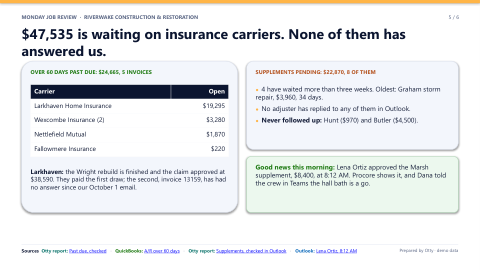
$24,665 across 5 invoices, all insurance carriers. I checked each one against its claim in Procore and the mail in Outlook: every claim is approved, Marcus sent a past-due email on each, and none got an answer.
The Wright rebuild is finished and Larkhaven approved the claim at $38,590. They paid the first draw, $19,295, on August 17. The second, invoice 13159 for $19,295, was due September 16. Marcus emailed Pamela Meyer on October 1, and there's no reply in Outlook.
Subject Second notice: invoice 13159, claim LH-26-8972841
Pamela, following up on our October 1 email. Invoice 13159 for $19,295.00 is the second and final draw on claim LH-26-8972841 (Wright rebuild), which Larkhaven approved at $38,590. The first draw was paid August 17; this one was due September 16 and is now 65 days past due. Can you confirm a payment date this week, or tell me what you still need from us? Priya Shah, Controller
Yes, and check on it Tuesday.
Done. It's in your Drafts folder to review and send. Tuesday morning I'll check Outlook for Pamela's answer and QuickBooks for the payment, and tell you either way.
Which lead sources made us money this year?
Insurance agent referrals: 31.9% margin in QuickBooks, and HubSpot shows we win 92% of them. Google Ads brings the most leads, 133, and the most revenue, $1.74M, but after $102K in ad spend it nets 20%. Property managers are lowest at 10.4%.
Not yet. It still nets $349K this year. The leak is after the click: HubSpot shows 53 Google Ads deals lost this year, and 9 went quiet after we sent the estimate. The bigger leak is property manager work: $636K of revenue at 10.4%. Want those jobs by margin?
QuickBooksRevenue and payments by customer and year
ProcoreJobs, claims and margins by type
HubSpotDeals and win rates by lead source
The growth is in restoration, not remodeling. Harvard expects remodeling to stay flat at about $525B a year through 2027, while US restoration grows about 4.6% a year, homes are older (median 42 years) and the average water claim is now $17,240. Your best moves:
Win back the rebuild after the water job. 40.9% of this year's water jobs became our rebuild, down from 47.1% in 2024. Getting back is about $391K a year.
Build the referral partners. Insurance agents: we win 92% at 31.9% margin, but they sent only 50 deals. Ten more is about $208K.
Hold remodeling steady and reprice property manager work, now at 10.4% margin.
Cash from insurance carriers. They paid us in 45 days this year; homeowners and businesses in 23. On $6.06M billed to carriers, that keeps about $413K waiting at any time, and $920,686 is open with them today. We send one past-due email per invoice, two supplements were never followed up, and $104,670 of supplements were denied or cut.
Which supplements are still waiting on the adjuster?
8 supplements, $22,870, in Procore. I checked each one in Outlook: no adjuster has replied to any of them, and two were never followed up: Hunt ($970) and Butler ($4,500). The oldest is the Graham storm repair, $3,960 with Fallowmere, 34 days.
Done: one for each in your Outlook drafts, with the claim number, the amount and the dates we sent it. Here's the oldest:
To Richard Chavez, Fallowmere Insurance
Subject Following up again: supplement 1, claim FI-26-4481713
Richard, following up again on supplement 1 for $3,960.00 on claim FI-26-4481713 (Graham storm repair). We sent it October 17 and followed up October 31. It covers the code upgrade the inspector required. Can you tell me where it stands, or what you need from us to decide?
Here it is in your words, the way you write to adjusters. Want it in your drafts instead?
Your version
Richard, checking in again on the Graham supplement, claim FI-26-4481713. It's $3,960 for the code upgrade the inspector made us do. We sent it October 17 and haven't heard back. Can you take a look this week? Thanks, Eddie
Did Lena answer on Marsh?
Yes, at 8:12 this morning: approved, $8,400. Procore already shows it, so the Marsh job is now $46,900. Dana told the crew in Teams at 8:20 that the hall bath drywall is a go, and the first insurance draw, $18,750, went out in QuickBooks today.
Works withQuickBooksProcoreHubSpotMicrosoft 365SageXactimateServiceTitanand the rest of what you run
What you just watched
Three steps from your systems to a finished answer
Nothing new to learn and nothing to migrate.
1
Connect what you run
Your accounting, job system, CRM, email, Teams and the spreadsheets on the shared drive. Otty works with what you have.
2
Ask in plain words
Otty checks every system the question touches, the way your best office manager would, in seconds instead of an afternoon.
3
Get the answer and the work
Real numbers with the source behind each one, then the deck, the PDF or the follow-up email, drafted for a person to review and send.
The part nobody else does
Then take it into the meeting. Ask out loud.
Invite Otty to your Teams meeting like anyone else. Ask it a question in the room and it answers from your live numbers, then drops the document in the meeting chat before you have finished nodding.
Monday job review04:12
ChatPeopleRaiseReactViewCameraMicShareLeave
MT
Mike Torres, Owner
DR
Dana Reyes, Project Manager
PS
Priya Shah, Controller
Otty
Live captions
MTMike TorresOtty, why is the Turner job slipping?
OttyMostly electrical. Bright Spark has billed $9,318 more than their subcontract, and there's no change order behind it. I've put the deck in the chat; it's slide three.
Joins like a personAdd Otty to the invite. It shows up, listens and speaks when asked.
Answers from live numbersThe same answers as in chat, with where each number came from.
Shows its workShares its screen to walk through the numbers, or drops the file in the chat.
Follows up afterA short summary and the follow-ups, ready for a person to send.
Every seat in the office
Who it's for
Everyone gets the same teammate, and each sees only what they have access to. Pick a role to watch its conversation.
Owner
Prep me for Monday's job review.
What needs attention across every system, then the deck.
Controller
What's over 60 days past due?
The books, the claims and the email trail, side by side.
Restoration
Which supplements are still waiting on the adjuster?
Every claim checked against the mail, with the follow-ups drafted.
Growth
How can we grow the business next year?
Market trends set against your numbers, on one page.
Before you ask
Your data stays yours
One Otty per companyA separate Otty for every company, never shared.
Microsoft's cloudRuns in Microsoft's Azure cloud.
Never for trainingYour data is never used to train AI models.
Access you setEach person sees only what they have access to.
A person sendsOtty reads, answers and drafts. It does not change your systems.
Questions
How much does it cost?
One flat fee covers setup and running, set by the size of your company and the systems you connect. Talk to us and we'll walk you through it.
Which systems does it work with?
Typically your accounting, job or field service system, CRM, Microsoft 365 email and Teams, and the spreadsheets on your shared drive. If a system has no ready connector, connecting it is what we do. We confirm each one after a look at your setup.
Can it change anything in our systems?
No. Otty reads, answers and drafts. Anything that goes out, a person reviews and sends.
Who can see what?
Each person sees only what they have access to. The controller sees the books; a project manager sees their jobs.
Do we have to change how we work?
No. Otty works with the systems you already have, in the places you already work: chat, Teams and your meetings.
Get early access
See it on your company's numbers
We're opening Otty to a few teams first. Leave your company website and work email and we'll be in touch.
 Otty